

Desktop clients
Back to PlatformMCP on Perplexity
Connect Onboard hosted MCP to Perplexity with your API key and production URLs.
Perplexity can use remote Model Context Protocol servers over HTTP.
Before you start
Complete the requirements on MCP setup (Admin access, MCP plan, API key from Integrations → API).
Configure Remote MCP
-
Navigate to https://www.perplexity.ai/computer/connectors or login to your Perplexity account, select your profile > click all settings > select "Connectors"
-
Select the option
+ Custom connector -
Fill in the connector details with the following information:
name: Onboard
MCP server URL: https://rest.onboard.io/mcp/sse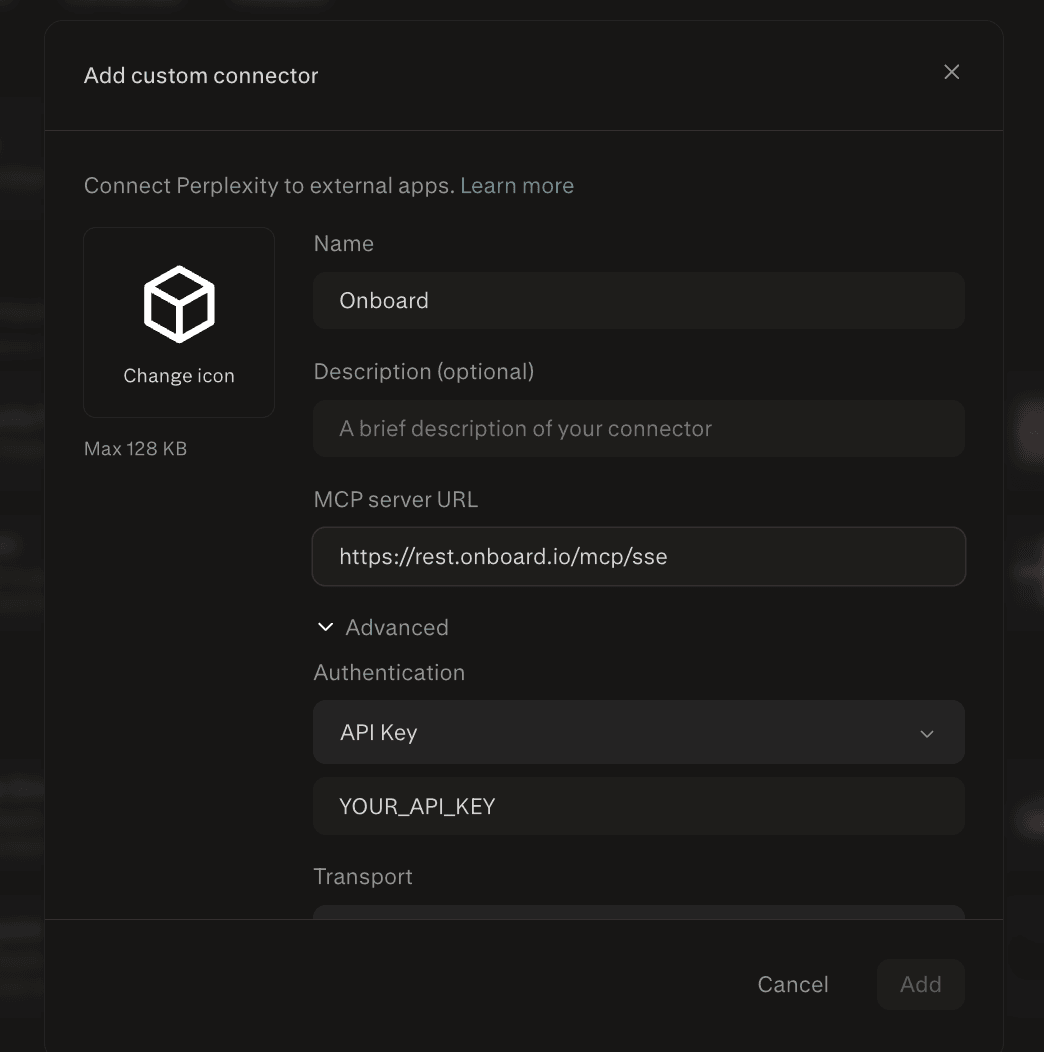
-
Under "Advanced" select "API Key" and enter your Onboard API key into the field
-
For "Transport" select
SSE -
Click "Add"
-
Once installed, you can have perplexity use the Onboard MCP by asking things like:
Using the onboard mcp, can you search for customers that match the name "Onboard"Related
- MCP setup — base URL, /mcp paths, authentication
- Security checklist
- MCP desktop clients
How is this guide?